SOLVED!!!
This PayPal errors and solution guide aims to assist the reader on how
to self-solve commonly encountered PayPal problems or issues. This post also
aims to be as extensive as possible so feel free to leave in the comment
section any concern that is not found or covered in this post.
Before moving
on, it is important to note that PayPal is one of the most popular and trusted
online payment processor by wfh (work from home) freelancers. Aside from remote
based freelancers, online consumers likewise uses PayPal funds availability as
their preferred choice due to its global reach and wide array of services plus
top notch safety protection features. For everyone's appreciation, the company
was founded more than two decades ago and has evolved to so much more.
But of
course, even though PayPal's services are most of the time seamless, no system
is perfect which is why errors or problems may randomly occur. Nonetheless,
these issues are mostly trivial and can be solved by just about anyone. The
PayPal solutions presented here can be followed by any person and they don't
need to be tech savvy or a computer whiz.
That being
said, here now are the self-serve solutions to the most commonly encountered
PayPal errors and problems.
You can no longer use PayPal

Image Source:
excerpt from chat support
Let us start
with the error many users are afraid of. In fact, it is not actually an error
per se, as it comes more like as a result or findings of sort already.
Users who
received this message have allegedly violated PayPal's terms of agreement or
one (or more) of its policies thereby will apparently no longer be able to
enjoy its services.
This one
comes at a very steep price which is of course totally understandable. PayPal
is one of the most preferred online payment gateways which is why many people
aims to game or cheat the system to illegitimately earn PayPal funds. As one of
the industry leaders, it can be assumed that it has a stringent security system
therefore users who receive this type of notice has seemingly triggered
PayPal's security by committing a very serious violation.
However,
there are some users who will argue that they have not done anything wrong
while there are those who are probably just unaware. In this regard, the
simplest solution is to contact directly PayPal's official support directly.
Notice the term official since there's a high chance of some fakers pretending
as support promising to help with the PayPal problem.
Payment Funds Temporary on Hold

Image Source:
error screenshot
This
particular PayPal problem may come in a variety of names like 21 days holding
period, payment temporary on hold, PayPal funds unavailable, etc... Despite
many users referring to it differently, it is important to note that it is not
an error since PayPal do hold funds in certain cases.
Some users
may say that this PayPal error is usually encountered by new accounts whose
reputation is yet to be established. And then there are those who might say
that it is due to suspicious transaction pattern or behavior. Although there
might be different scenarios, this post will focus on those instances
experienced or reported by freelancers.
As mentioned,
many freelancers prefer to use PayPal to receive their payment which is why it
may cause a certain level of panic to read that the funds will be on temporary
hold for 21 days. That uneasy feeling will obviously magnify if for each
project, the client's payment are always on hold (meaning it happened more than
once).
If you are no
longer a new (or relatively new) PayPal user, don't worry as it is possible
that there has just been a miscommunication between you and the client. To
ensure seamless fund processing, simply ensure that you
• Mark the services rendered as processed
• Send the invoice to the client
• Inform the client to confirm the payment
• Send the invoice to the client
• Inform the client to confirm the payment

Image Source:
excerpt from HowTo Help
Of course,
the above three steps are just the gist of the PayPal solution process that
should be done. It is still up to the agreement between you and your client if
a project or task should be marked submitted and deemed completed thus
confirming payment.
Link a Card ERROR
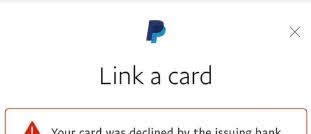
Image Source:
error screenshot
Another
PayPal problem users may have is linking a card to their account. The self
serve solutions here may vary since there are also a number of possible causes
for this error, which is sadly falls on the side of the user. For instance, the
provided card details are incorrect (i.e date of expiration, card number, wrong
OTP, etc...) Although sometimes, the card is already associated with another
PayPal account that the user may have forgotten.
Card Declined by the Issuing Bank

Image Source:
error screenshot
Another
PayPal problem users may encounter is when the card is declined by the issuer. As
can be seen in the message, this error is not entirely in PayPal’s side. If
PayPal rejected a card, it probably is due to triggering an alarm in PP’s
security algorithm. As mentioned, PayPal has strict security measures to prevent
possible unwanted scenarios (like unwanted charging of legit individuals).
Likewise, the system routinely does this to protect its funds from unscrupulous
people.
• Card has already exceeded its credit limit
• There is currently an issue on the card’s side or ongoing problem with the internet provider preventing the transaction
There are still a few PayPal errors out there whose solution is yet to be posted here. Be sure to come back as this self-serve guide will be frequently updated.
Related Links / Reads:
Should I leave my job and work online?
Another Payment from Hubpages
© 2020 to 20++ mixjikz.blogspot.com | ALL RIGHTS RESERVED | PROTECTED BY COPYRIGHT LAW

