SOLVED!!! This GCash errors guide will discuss different topics that includes unauthorized transactions, disuptes, PayPal to GCash cash-in errors, failed transactions, and GCash withdraw problems.
Naturally, this GCash help guide also assumes that the reader is
already familiar with the platform basics and its aspects such as fund
transfer from PayPal to GCash, cash in remittance options, etc...
However, readers not familiar with said GCash said options may begin
with the following topic:

Moving on, there are some instances where problems may arise or GCash will encounter errors, though not often but seldom -- particularly withdrawing or transferring PayPal money to GCash. Don't worry though, this GCash help post exist here to help you out.
Just remember, GCash failed withdrawal transaction problems might be a result of a system issue in either GCash or PayPal. Although, it is also possible that it is an isolated incident if only a single user is affected and other users does not encounter the error. If this is the case, it would be wise to call the GCash hotline (dial 2882 from your Globe or TM mobile phone) for a quick response to resolve the GCash problem.
Unauthorized Transactions and Disputes
GCash unauthorized transactions is one of the most common error encountered by some GCash users. Unauthorized basically means any transaction that is not legitimately done by the account owner.
Luckily, the simple solution to this GCash unauthorized transaction error is to file or submit a ticket in the app’s Help section. From there, simply locate “unauthorized transaction” or the category that best fits the concern. Don’t forget to fill up the rest of the required information before submitting the ticket.
Once the ticket is sent, you will receive an email from GCash support summarizing the concern and asking for more information. Be sure to provide accurate details as they respond rather swiftly. All in all, the funds from the unauthorized transaction was completely returned in less than week. And if you would look closely in the photo, aside from the usual Reference No., there is also a Refund Reference No. Not sure what this is but it might their own internal traceability of refunds transactions.
Oops! Already being used by another CIMB
The error message "Oops! Your account details is already being used for another CIMB savings account. Please contact us at savemoney@gcash.com for more information"
This GCash message is quite straightforward and may happen if your GCash credentials is already linked with a GSave account. Each person is only allowed one GSave account even though two GCash accounts are allowed per person.
Think of it this way, a GSave account is quite bank related. Each bank account can only be owned by a single person.
GCash Voucher Errors
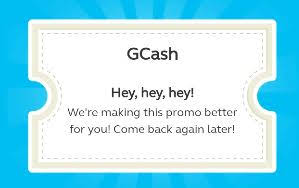
Since GCash vouchers are gaining traction and becoming more and more popular, a few errors is quite expected when availing or redeeming the GCash voucher. Some popular GCash voucher errors are shown below.
When I encountered the Hey Hey Hey and Oh My G voucher error, it somewhat corrected itself. For the first one (Hey Hey Hey), I simply waited a few hours when re-scanning the QR code and it was already successful. The same goes with the Oh My G This feature isn't available to you yet, after waiting a few hours, it was already successful.
Another GCash Voucher error that may be encountered is when the SMS notification was not received by the merchant's mobile device. It is possible that merchant's inbox is already full thereby unable to accommodate new incoming messages. Although it is possible that the text message is only delayed.
In any case, do not worry. Simply inform the cashier of the transaction reference number as they need to input it on the cash registrar (I think GCash has cascaded the proper procedure and guidelines in scanning QR vouchers). However, in case some cashiers may have forgotten or not aware of this, GCash may also have a contact number that can be reached to handle such situations.
Oops! Code HJL3
This particular GCash error code apparently happens when the number linked to the account is not synchronizing properly with the device.
To resolve this error, simply re-input your mobile number to the GCash app of the device. To do this, you may click on "Change" on the login screen of the app. Or you may also uninstall/reinstall the app. Doing so will also ask you to input back your GCash mobile number.
Please be advised that an OTP authentication code will be sent when doing the above process
Missing or Incorrect Step During the Linking Process
Let's begin this GCash help with this topic as this affect both newbies and novice users. Please be informed that if the linking process between GCash and PayPal is not complete, GCash money transfer problems is likely to happen. Remember, to complete the following steps in order to have a successful money transfer / exchange (using PayPal as the Cash-In option) between PayPal and GCash:
1. Have a verified and active PayPal account (see Verify PayPal Account Using GCash Mastercard guide provided above)
2. A validated GCash account and a working GCash Mastercard
3. Connect PayPal to GCash as a Cash In option through PayPal's Pre-approved payment plan
The instructions for items 2 and 3 can be found on the other link / guide also mentioned above: How to Withdraw PayPal to GCash
"Oops!... Paypal Pre-Approved
Payment Plan is still pending..."
As can be seen on the screenshot above, a failed transaction will occur if PayPal's pre-approved payment plan is still pending. Listed below are possible reasons for this GCash failed transaction error:
1. You have not completed the guide provided on the links above.
Please be advised that linking PayPal with GCash as Cash In option is essential for both platforms to recognize each other and transfer online money between them
2. You have just finished the process earlier.
If this is the case, although approval is supposed to be instant, give it at least some leeway for it to take effect. If after a considerable time has lapsed and the process is still pending, it would be best to follow it up with either PayPal or GCash support
However, if you have already linked your PayPal account and was able to successfully transfer PayPal funds to GCash before, it is possible that something has triggered the problem causing the link to be broken. If this happened, the Pre-Approved payment plan might have been cancelled or have reverted back to pending status.
Based on experience, the PayPal cash-in error above was encountered when the GCash mobile app self-updated and it asked for a lot of steps before logging in -- steps like what is the mobile number, entering the OTP, putting in the MPIN, etc...
Usually, the app will only ask for the MPIN upon launch, but on that particular situation, it is like everything has been restarted thus each detail needs to be refreshed on the device's GCash mobile app.
Anyway, the solution to this GCash problem is to simply re-link PayPal with the GCash mobile app. Again, if you have forgotten the steps, the complete procedure is listed on the guide / link which is mentioned in the beginning part of this post.
• PayPal Errors and Solution
For SOLUTIONS to the most common PayPal ERRORS
Account Limit Reached
This GCash help guide will also advise that a failed transaction may happen if the user's account still has limitations on it from either PayPal or GCash. This will happen if the account is not yet verified which is why the limits are still in place or not yet lifted.
To lift the limits or restrictions, simply use the easy-to-follow verification process found on Verify PayPal Account Using GCash Mastercard for both GCash and PayPal.
Not KYC validated error
This particular GCash failed transaction error is already quite straight to the point. It simply means that the GCash account is not yet validated. Readers that are relatively new to PayPal and GCash who skipped the linking process above would probably encounter this error since a verified account is needed for a successful PayPal to GCash fund transfer. Otherwise, an error would definitely be encountered.
Oops Something Went Wrong
Unfortunately, this particular error is very vague and may have different causes.This GCash help post would need more information (via the comment section) to address this concern.
PayPal balance was deducted but did not reflect on
GCash (system enhancement / maintenance)
This GCash help guide will not be complete without this particular problem. Anyway, this particular GCash failed transaction is the type of error many users are afraid of. Just imagine, the amount indicated to be transferred was decremented on PayPal's account balance, but for some strange reason, it was not received
by GCash. Naturally, the user will panic in such cases as this type of PayPal
withdraw error translates to lost money and the user wondering where did the
funds go? WIll the money come back? Can it be recovered? etc...
Before going crazy and cursing all the online gods,
consider first some possible scenarios. It might be that the funds are just
delayed or that a refresh (logging out and in) may be needed by the GCash app to resolve the error.
If the amount is still not reflected in the GCash mobile app, try checking the
balance status via SMS (send to 2882) or USSD (dialing *143#).
If the problem still persists and the money is still not received on GCash, check the
sites of either GCash or PayPal to see if there are any announcement of system
downtime or maintenance. Errors such or similar to this would normally happen if there is an ongoing system enhancement on GCash during the withdrawal or cash-in was made. It would also be advisable to ask feedback from other
users if they are experiencing the same.
If there is indeed a system enhancement ongoing, the money may be deducted from PayPal but will not arrive in GCash due to the maintenance. In such cases, it would be best to consult with
support from PayPal or GCash to recover the online funds as it may have only been an isolated incident.
Since GCash is a local company, you may want to consult with them first. After explaining the problem, two probable choices would be (a) return back the money to PayPal or (b) push through with money transfer to GCash. Either way, the money is probably stuck somewhere but may not be completely lost. Also, it might take 2 to 3 business days for either of the choices to complete the process.
Unable to link PayPal to GCash for Cash IN
The usual culprit of this problem is that the
credentials of Paypal and Gcash did not match. Please ensure that the name that
appears on your Paypal account is exactly the same as the one on your Gcash
account.
If the two are different, it would be impossible to
link the two. This is the reason why, it is advisable to use Gcash to verify
your PayPal account since you will be using the same card -- hence, the same
name. Additionally, if you use PayPal to receive your online earnings like Hubpages or is a fresh grad earning online then it is paramount to ensure that successful fund transfer from PayPal to GCash.
That's just about it for common errors and issues that
would likely cause failed PayPal fund transfer to Gcash. If you encounter a
different type of PayPal withdraw problem to Gcash, feel free to use the
comment section.
© 2020
to 20++ mixjikz.blogspot.com | ALL RIGHTS RESERVED | PROTECTED BY COPYRIGHT LAW